
SSL/TLS is a security protocol, originally developed by Netscape Communications Corporation, which provides a common security layer for all TCP/IP applications. Transport Layer Security is the name of the Internet standard for the SSL/TLS protocol. The ClearPath MCP Environment supports TLS 1.0 (RFC 2246) and TLS 1.2 (RFC 5246).
| Note: | Support for TLS 1.0 is disabled by default. |
TLS enables secure transmission of information between a client and server through the use of authentication and encryption techniques.
SSL/TLS ensures a secure connection across a TCP/IP network for MCP applications. Web Transaction Server for ClearPath MCP uses SSL/TLS for SSL/TLS-enabled web pages, forms, and other data transfer methods. User-written programs using SOCKETSUPPORT and TCPIPNATIVESERVICE port files as well as system software (for example, FTP) can access the SSL/TLS protocols on both the client and server sides.
How SSL/TLS Uses MCP Cryptographic Services
SSL/TLS offers data security through the use of cryptographic services that are provided by the MCAPISUPPORT library of the MCP environment and the CryptoProxy service of MCP Cryptographic Services running in the Windows environment of the ClearPath MCP server. These two components communicate over a secure internal connection.
SSL/TLS is integrated into the TCP/IP networking software for the ClearPath MCP server.
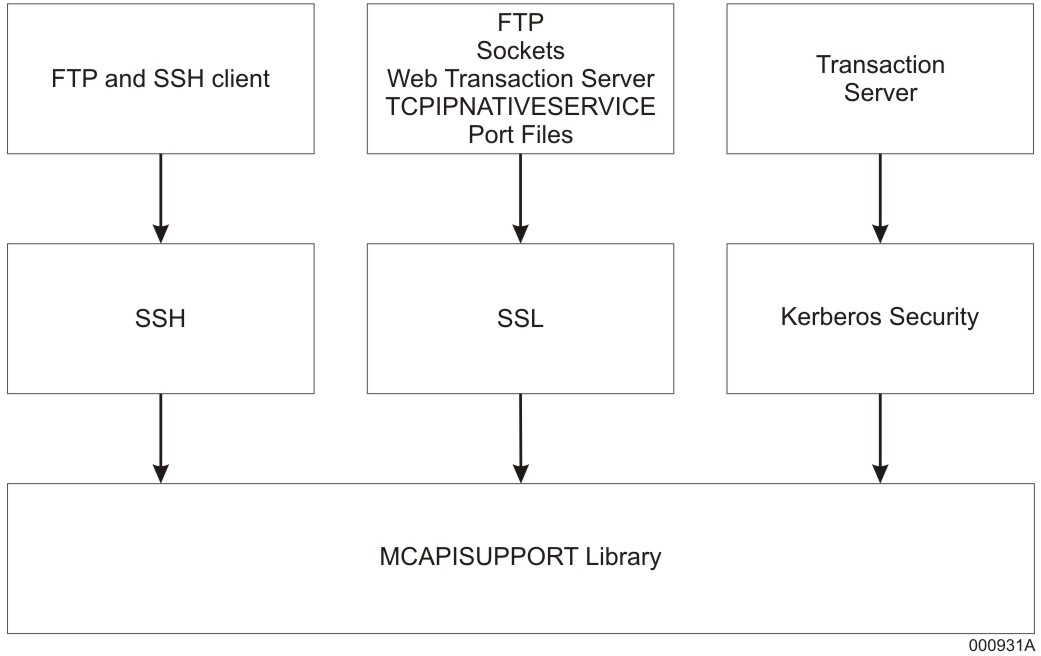
Security Protocol Layers for ClearPath MCP Server represents the relationships of the security protocol layers for a ClearPath MCP server.
How SSL/TLS Establishes Trust
The MCP supports two methods for TLS servers and clients to authenticate each other:
-
Chain of trust, based on root and intermediate Certification Authorities
-
Direct authentication of TLS subject (also referred to as end entity) certificates
These two methods differ in their trust model. The Certificate Authority based trust model will trust any certificates that have been issued by the Certificate Authorities in the Trusted Store that is in use. This model is useful when all of the certificates that have been issued are allowed to access the resource; however, this broad scope of trust may pose security concerns because every certificate issued by the root CA or any linked intermediate CA will be trusted.
The Direct Authentication trust model will only trust those subject certificates that are in the Trusted Store. This trust model is more useful when only specific remote resources are allowed to access the resource. This narrower scope of trust is generally more secure because only specific subject certificates are trusted, avoiding the potential risks of CA certificates.
Chain of Trust
As part of the SSL/TLS handshake, the identity of the server (and optionally, the client, if requested by the server) is validated. This validation is done by sending the X.509 certificate of the peer across the connection to the opposite side (for example, the server sends its X.509 certificate to the client). In order for the X.509 certificate to be validated, the computer must trust the Certification Authority (CA) that issued the X.509 certificate. On Windows workstations, browsers provide the interfaces to add, delete, and manage the list of “Trusted Root Certification Authorities” or “Trusted Intermediate Certification Authorities,” which is part of the operating system. The certificates of the trusted Certification Authorities, known as root certificates, allow the browser (the client) to trust the certificates sent by SSL/TLS-enabled websites.
On the ClearPath MCP systems, Security Center provides the interface to add, delete, and manage the list of trusted certificate issuers. These “stores” contain the certificates of the Certification Authorities that are to be trusted. The default trusted store, called ROOT, is checked when no other trusted store has been specified by the application.
If SSL/TLS-enabled software such as FTP or a TCPIPNATIVESERVICE application must run on the ClearPath MCP environment (communicating with an SSL/TLS-enabled server on another computer), the trusted store in use must be set up with the appropriate Certification Authority certificates for SSL/TLS-enabled connections to open successfully. This trusted store is by default called ROOT. If this is not done successfully, the error code ESSLCertAuthenticationFailed (-244) is returned.
In case of client authentication, the client provides a X.509 certificate whose CA certificate chain must be pre-installed on the server system for the client authentication process to be a success. MCP systems offer various cases of acceptance with respect to client certificates. The various cases include NONE, ALLOWED, DESIRED & REQUIRED. For more information on FTP, refer to the TCP/IP Distributed Systems Services Operations Guide.
On MCP systems, the client authentication feature is optional. By default, the option is disabled. The user will have to enable the option based on what application he or she will be using accordingly.
| Note: | If you choose to use chain of trust authentication exclusively, you should not install any subject certificates in trusted stores.If a mix of subject and root CA certificates are used, then the MCP will first attempt to find a match for the provided subject certificate, and then check chain of trust if a match was not found. |
Direct Authentication of Subject Certificates
For direct authentication, the certificate chain passed by the peer is inspected and validated. However, only the subject certificate must be present in the trusted store; the root CA certificate is not required.
For inbound TLS traffic (where the MCP system is the TLS server), direct authentication of client subject certificates can be enabled by installing/importing the subject certificates in the trusted store associated with the TLS service (for example, FTP or CCF). During the TLS handshake, the TLS service on the MCP server first validates that the subject certificate passed by the client matches one in the store. If a matching certificate is present, the connection is authenticated. If the client subject certificate is not present, the chain of trust is checked next.
For outbound TLS traffic (where the MCP system is the TLS client), direct authentication of server subject certificates can be enabled by installing/importing the subject certificates in the trusted store associated with the TLS client application (for example, FTP). During the TLS handshake, the MCP TLS client first validates that the subject certificate passed by the server matches one in the store. If a matching certificate is present, the connection is authenticated. If the server subject certificate is not present, the chain of trust is checked next.
| Note: | If you choose to use direct authentication exclusively, you should delete all root CA certificates from the relevant trusted stores.If a mix of subject and root CA certificates are used, then the MCP will first attempt to find a match for the provided subject certificate, and then check chain of trust if a match was not found. |
