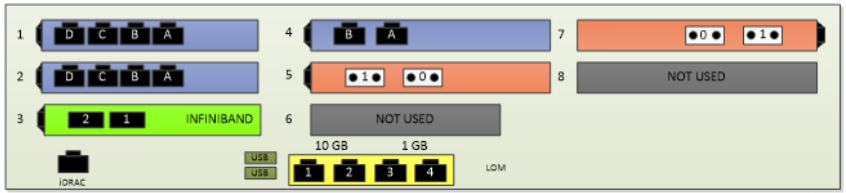
For nonpartitionable enterprise partition platforms (EPPs), connect any of the NIC ports to your network and any of the fibre channel HBA ports to your storage subsystem.
For a partitionable EPP,
Using the Fabric Manager user interface, view the partition summary of a particular partition on the partitionable EPP.
Click View Port Info to display a logical diagram of the NIC and HBA ports allocated to the partition.
Identify the physical location of the ports, and then connect the ports appropriately to your network.
Note: If multiple ports are allocated to your partition, be sure to cable all described ports to your network.
Figure 1. Example of Physical Location of Ports for 2-Socket Enterprise Partition Platform with 3 NICs and 2 Fibre Channel HBAs