Purpose of Logging Client
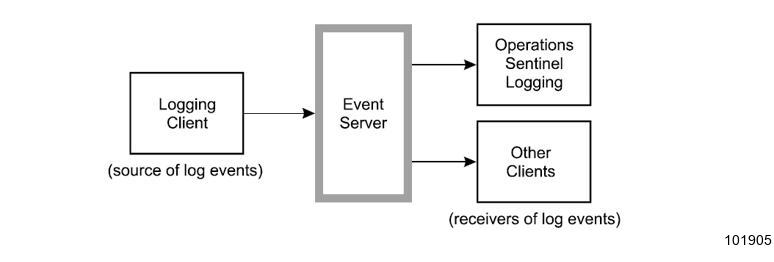
The llogging example shows how a client can log a message by sending a log event to the Event Server. No event loop is required since asynchronous event notification is not needed to accomplish this.
Code
using System;
using Spo.SPDlib;
namespace ExamplesOfAPIUsage
{
    class MyAlertPrgram
    {
        // Additional class member attributes declaration...
        [STAThread]
        static void Main(string[] args)
        {
            // create a SPD class instance
            SPD m_spd = new SPD();
            // Initialize the API.
            // Application name = "log message example"
            // No application qualifier.
            m_spd.SPDInitClient("log message example", null);
            // Client processing...
            // Log a message:
            //      The message "An important..." is written to "logfile"
            //      as a normal ("NO") message.
            //      Application name and qualifier are the defaults.
            //      No timestamp.
            m_spd.SPDLogMessage("logfile", "NO", "An important event has occurred",
               null, null, null);
            // More processing of client events...
            // No event processing required if events are only sent, but not
            // received.
            Console.Read();
        } // function: Main
    } // class: MyProgram
}// namespace: ClientSampleProgram
Data Flow Diagram
This illustration shows the flow of information for the logging client.